
Public ledgers are designed to be entirely transparent, but the raw data streaming across decentralized nodes is written in cryptographic hashes and hexadecimal code. It is completely unreadable for the average person. To interact with this information, investors use a specialized software window called a Blockchain Explorer.
Often described as the “Google of the crypto world,” a blockchain explorer is a public search engine built to parse, index, and display raw on-chain data in a human-readable format. Whether you are executing a modest transaction or managing a complex smart-contract portfolio, learning how to interpret an explorer is a foundational skill for maintaining capital control and verifying market transparency.
How a Blockchain Explorer Works Under the Hood
Blockchain Explorer
A blockchain explorer is an online tool that lets anyone view and verify blockchain data, including transactions, wallet addresses, balances, blocks, and network activity in real time.
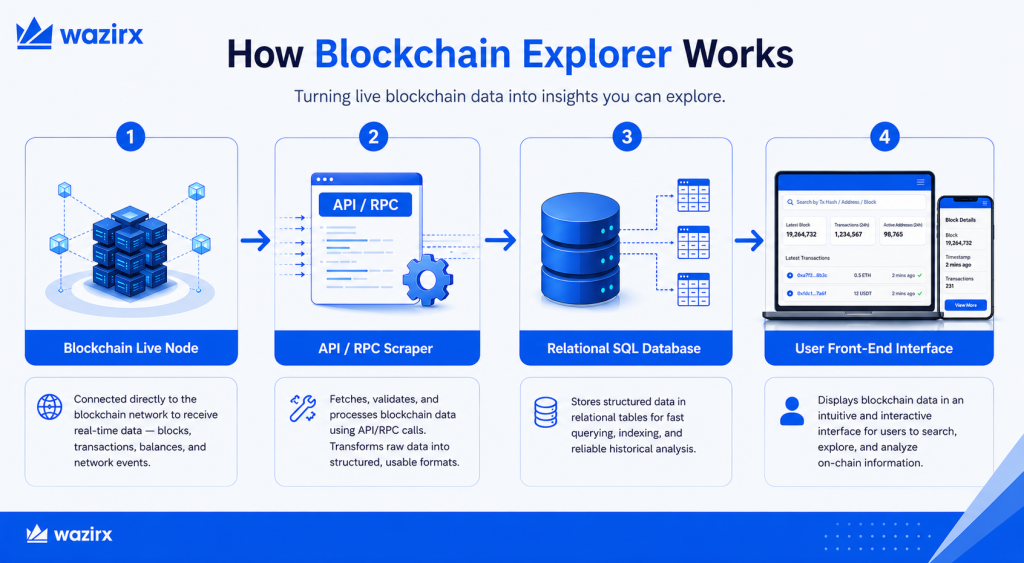
A blockchain explorer does not change or validate data on the ledger; it simply acts as an administrative mirror. To provide real-time updates, the platform runs a dedicated indexing system that works via three core technical layers:
- Node Data Extraction: The explorer connects directly to a full node of a specific network. Through remote procedure calls (RPCs) and Application Programming Interfaces (APIs), it maintains a constant live stream of every newly broadcast transaction, pending block, and smart-contract state change.
- Relational Database Storage: Raw blockchain records are fundamentally disorganized for fast searching. The explorer takes this raw stream and reorganizes it into an optimized relational database containing clear columns and rows, utilizing languages like Structured Query Language (SQL).
- The User Interface (UI): When an investor searches for a wallet or a transaction ID, the front-end interface fetches the indexed data from the relational database instantly, presenting it in neat tables and charts.
The Chain-Specific Rule
Because different networks utilize entirely unique coding architectures and consensus engines, explorers are chain-specific. A Bitcoin explorer like Blockchain.com or mempool.space can only read the Bitcoin ledger.
If you send a transaction on Ethereum, you must paste that data into an Ethereum-specific explorer like Etherscan. Similarly, Solana relies on Solscan, and Polygon utilizes Polygonscan. If you paste a valid transaction ID into the wrong network’s explorer, the interface will simply return an error.
The Four Core Pillars of Available On-Chain Data
When you open the homepage of a major block explorer, the dashboard displays a wealth of live macroeconomic data points. Investors can drill down into four primary categories of information:
1. Individual Transaction Pages
Every time value moves on a public ledger, it generates a unique cryptographic fingerprint called a Transaction Hash (TxID). Pasting a TxID into an explorer reveals:
- Status: Confirmed, Pending (waiting in the memory pool), or Failed.
- Addresses: The exact sender and receiver wallet public keys.
- Value: The precise quantity of tokens transferred.
- Network Fees: The transaction or gas fee paid to the miners or validators who processed the block.
2. Wallet Address Profiles
Public addresses are pseudonymous, meaning they hide your personal identity but display your complete financial behavior. Inputting any public wallet key into an explorer reveals its current token balance, its historical inbound and outbound transfer logs, and any smart-contract or decentralized finance (DeFi) positions tied to that address.
3. Block Metrics
Investors can view data on specific blocks added to the chain. This includes the block height (its exact page number in the ledger sequence), the timestamp of when it was validated, the identity of the mining pool or validator that built it, and the specific block reward issued by the protocol.
4. Macro Network Statistics
Explorers double as health monitors for entire decentralized ecosystems. They feature live charts tracking total network hashrate (computing security power), relative mining difficulty, average gas fee costs, and circulating token supply updates.
Advanced Capabilities of a Blockchain Explorer: Smart Contracts and Forensic Tracking
As investors transition beyond basic transaction checks, block explorers provide highly sophisticated features to verify decentralized interactions.
Smart Contract Code Verification
For smart-contract-enabled networks like Ethereum, developers can upload and verify their source code directly on the explorer. When an investor visits a verified contract address on Etherscan, they can click the “Contract” tab to read the actual code line-by-line.
This allows cautious participants to audit decentralized applications (dApps) independently, ensuring that a lending vault or a token presale contract functions exactly as advertised without hidden malicious functions or backdoor security risks.
Tracking Institutional Behavior and “Whales”
Because all wallet profiles are public, explorers are heavily utilized for market analysis and blockchain forensics. Analysts routinely track large concentrations of token supplies held by institutional wallets, known as Whale Wallets.
By setting up automated tracker alerts for specific high-value addresses on an explorer, market participants can observe when major holders are accumulating assets or transferring large volumes to exchanges, providing an early behavioral data signal before major market moves occur.
Final Thoughts
A blockchain explorer should be treated as your primary line of technical defense. Relying on an app interface to tell you whether your money is safe introduces an unnecessary reliance on third parties. Learn to navigate an explorer independently, and you learn to read the public ledger directly, verifying transaction finality, confirming wallet safety, and tracking network fees with absolute empirical certainty. Mastering the block explorer transforms your portfolio execution from blind reliance into data-backed sovereignty.
FAQs
To track a transaction, copy your unique Transaction ID (TXID) or hash from your crypto wallet. Paste this string into the search bar of a relevant block explorer (like Mempool for Bitcoin or Etherscan for Ethereum). The explorer will display details including the sending/receiving addresses, fees paid, and current status.
As an individual user, you do not manually confirm transactions. Instead, network participants called miners (in Proof-of-Work networks) or validators (in Proof-of-Stake networks) verify and bundle your transaction into a new block. Once that block is added to the ledger, your transaction receives its first confirmation.
Yes. Most advanced explorers display unconfirmed transactions that are sitting in the network’s mempool (memory pool). These transactions are visible to the public but will be marked as “Pending” or “Unconfirmed” until a miner or validator includes them in a block.
A blockchain transaction confirmation time depends on the network, transaction fees, and congestion levels. Some blockchains confirm transactions in seconds, while others may take several minutes. Higher fees often lead to faster confirmations, as validators or miners prioritize those transactions.
 Disclaimer: Click Here to read the Disclaimer.