

Calculating crypto taxes manually can quickly become overwhelming. Your transaction history must be reviewed to identify taxable VDA transfers, calculate the taxable VDA income and separately account for crypto futures activity.
WazirX TaxLyst simplifies this process by automatically calculating your crypto taxes and generating reports that helps with your Income Tax Return (ITR) filing.
What is TaxLyst?
TaxLyst is WazirX’s crypto tax calculator built for Indian crypto investors. Simply upload your exchange transaction history, and TaxLyst automatically processes your trades to calculate:
- VDA gains and losses
- Estimated tax liability on reported VDA income
- Futures P&L
- Exchange-wise transaction summaries
- Schedule VDA-ready reports
TaxLyst supports trade history imports from multiple crypto exchanges and automatically identifies the relevant financial year for your transactions.
Also read: Crypto Taxes in India, explained for Beginners
How to Generate Your VDA Tax Report
Follow these six steps to generate your crypto tax report.
Step 1: Visit TaxLyst
Head to taxlyst.wazirx.com to get started.

Step 2: Download Your Exchange Transaction Report
Log in to the crypto exchange where you’ve traded and download your transaction history.
For this walkthrough, we’re using a spot trading report, but TaxLyst also supports reports from various exchanges and automatically detects the report format.
Step 3: Upload Your Report
Upload your downloaded transaction file to TaxLyst.
Once the upload is complete, TaxLyst will validate your report and prepare it for processing.
Step 4: Configure Your Tax Report
After your file has been successfully uploaded:

- Enter your full name as per tax records.
- Review the report configuration.
- Click Generate Report.
TaxLyst applies the FIFO method to match acquisitions with subsequent disposals.
Step 5: Review Your Tax Summary
Once processing is complete, you’ll receive a comprehensive tax dashboard containing:
- Estimated Tax liability
- Capital gains by financial year
- Exchange-wise transaction breakdown
- Separate futures and derivatives summary
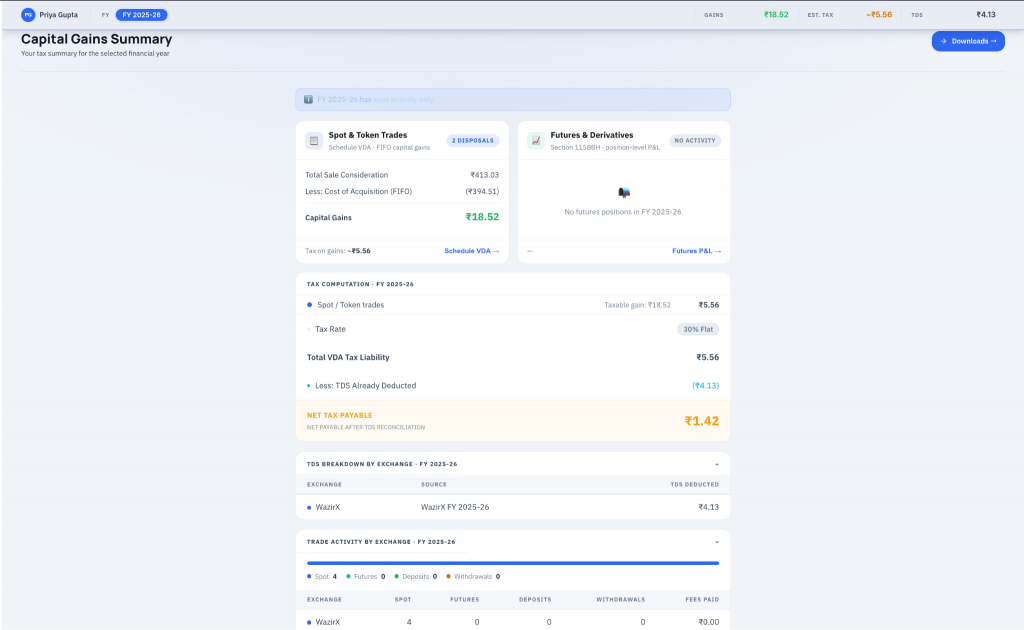
This gives you a complete overview of your crypto tax position before filing your returns.
Step 6: Download Your Reports
TaxLyst allows you to download multiple reports depending on your needs.
- PDF Tax Report: Download a complete tax report for the selected financial year in PDF format.
- Schedule VDA CSV: Contains individual disposal records formatted according to the official Indian Income Tax Return (ITR) Schedule VDA requirements.
- Transactions CSV: Exports your complete trading history, including: exchanges, trading pairs, buy and sell prices, volumes, trading fees, TDS deducted etc.
- USDT/INR Rates CSV: Shows the exchange rates used to convert USDT-denominated trades into INR for tax calculations.
- Futures P&L CSV: Provides a detailed breakdown of: Position-level profit and loss, trading fees, realized gains and losses from crypto futures
Why Use TaxLyst?
TaxLyst consolidates your transaction history, applies FIFO to spot VDA transactions and generates reports designed to assist with Indian income-tax filing. It also provides a separate breakdown of futures activity.
Tax calculations depend on the completeness and accuracy of the transaction data uploaded. TaxLyst does not file your return or provide tax advice. If you have traded across multiple exchanges or wallets, received airdrops or gifts, conducted P2P transactions or traded futures, consider reviewing the reports with a qualified tax professional.
Disclaimer: TaxLyst generates reports based on the transaction data you upload. Before filing your Income Tax Return (ITR), please review the report and consult a qualified tax professional or chartered accountant to ensure it is accurate and complete.
 Disclaimer: Click Here to read the Disclaimer.